Design Custom Sublimation Letters with Canva Frames
Creating custom letter designs for personalized gifts, signage, or branded merchandise often involves a frustrating disconnect. You might have a beautiful graphic pattern or a vibrant sublimation design, but converting that into a clean, consistent alphabet for t-shirts, mugs, or wall art is tedious. Tracing, masking, and manually adjusting each letter individually slows down production and limits creative flow. This is where a specialized tool changes the game for crafters and designers alike.
A Streamlined Approach to Custom Typography
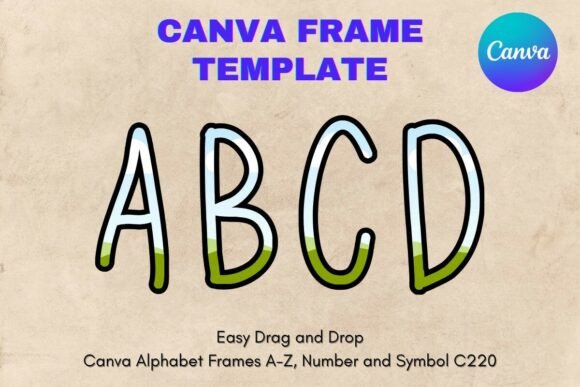
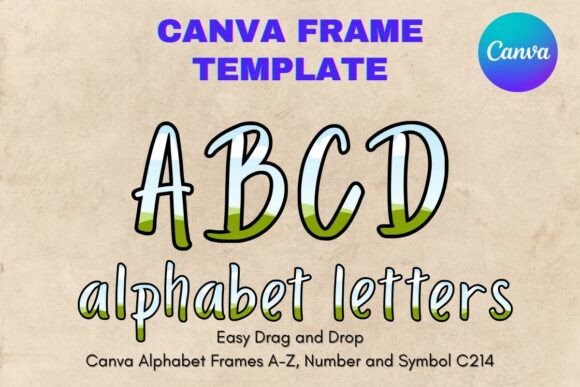
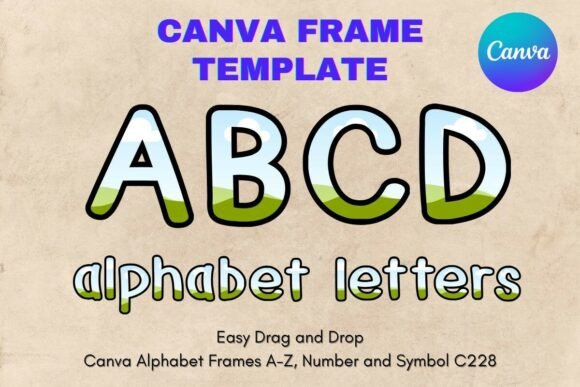
The Canva Letters Frame Alphabet Template228 offers a practical solution by providing an editable framework directly within Canva. It is important to clarify exactly what this asset is: it is not a standard font file like a TTF or OTF, nor is it a static PNG or SVG. Instead, it is a PDF containing a link to a custom-made Canva template. This distinction is vital because it defines how you interact with the tool. You are working with editable Canva frames, which function as masks or placeholders for your own images and patterns.
Visually, the "Template228" style focuses on utility and form. The frames are designed with specific proportions and clear boundaries, ensuring that whatever design you drop inside maintains a recognizable letter shape. The style is inherently neutral by design; the personality comes from what you place inside the frame. This makes it a versatile asset for modern typography projects. Whether you are aiming for a rustic, hand-painted aesthetic or a sleek, corporate look, the frame adapts to your input. The transparency of the layers is a key feature, allowing the letters to blend seamlessly onto various background colors without the hassle of manual background removal.
Practical Applications for Crafters and Professionals
The versatility of this template extends across numerous industries. For small business owners involved in the sublimation market, this tool is invaluable. You can quickly generate full names, monograms, or short phrases for inventory. Imagine creating a set of personalized tumblers for a wedding; instead of laboriously cutting vinyl or importing complex vector files, you simply drag your watercolor texture or floral pattern into the letter frames. The result is a clean, professional finish that looks like a custom die-cut, even though it was created entirely digitally.
Graphic designers and marketers can also leverage these frames for logo design and social media graphics. If a client needs a bold header that incorporates a specific brand texture—like marble, wood grain, or a digital glitch effect—these frames provide the structure to execute that vision. It works exceptionally well for packaging design mockups, where you want to show a product name rendered in a unique material. Furthermore, bloggers and content creators can use these frames to create distinct header images that stand out in crowded newsfeeds, maintaining visual consistency across editorial design projects.
Integrating the Template into Your Workflow
Getting started is straightforward, but there are nuances to maximizing the tool's potential. Once you access the template via the provided PDF link, you will open a Canva file containing the full alphabet. The setup is optimized for 8.5x11 inch paper, which is standard for home printing, but the vector-like scalability of Canva elements means you can resize these frames significantly without losing quality. This is crucial for large-format printing or scaling down for intricate jewelry designs.
To use the frames effectively, follow this process:
- Prepare Your Pattern: Upload your chosen background texture, photo, or sublimation design to your Canva uploads folder.
- Drag and Drop: Click on the specific letter frame you need. Drag your uploaded image directly over the frame until the entire letter highlights in blue, then release. Canva will automatically clip the image to the shape of the letter.
- Adjust and Refine: Double-click the filled letter to reposition the pattern inside. This allows you to center a specific part of a floral print or align a stripe perfectly.
- Export: Download your finished design as a PNG with a transparent background (available on Canva Pro) or a Print PDF. This ensures the "paper" background doesn't appear on your final product.
For those concerned about readability, the structure of the frames generally favors display usage. They are designed to be bold and recognizable, making them ideal for headlines, titles, and single-word statements. When using busy patterns inside the frames, ensure there is enough contrast between the pattern colors and your final background to maintain legibility.
Strategic Design Considerations
When incorporating the Canva Letters Frame Alphabet Template228 into your brand identity or product line, think about consistency. Because this is a template system, it allows you to maintain a uniform shape and size across all your lettering. This is a significant advantage over freeform hand-lettering, where sizing can drift. For a cohesive product line—say, a series of nursery decor prints—using these frames ensures every letter has the exact same visual weight and proportion.
While the frames provide the shape, the choice of fill determines the mood. A script font frame filled with gold foil texture conveys luxury and elegance, suitable for wedding stationery. Conversely, the same frame filled with a rough, concrete texture creates an industrial, edgy vibe suitable for streetwear branding. Experiment with font pairing concepts by mixing these framed letters with standard Canva fonts. For example, use the framed letters for the main noun of a headline and a clean sans serif font for the supporting text to create a strong visual hierarchy.
Ultimately, this digital asset serves as a bridge between raw creativity and professional execution. It removes technical barriers, allowing you to focus on the design itself. Whether you are a hobbyist making gifts for friends or a professional designer managing multiple client projects, having a reliable set of editable letter frames in your toolkit saves time and expands your creative possibilities. It transforms a simple pattern into a typographic statement with just a few clicks.
Design Custom Sublimation Letters with Canva Frames
Creating custom letter designs for personalized gifts, signage, or branded merchandise often involves a frustrating disconnect. You might have a beautiful graphic pattern or a vibrant sublimation design, but converting that into a clean, consistent alphabet for t-shirts, mugs, or wall art is tedious. Tracing, masking, and manually adjusting each letter individually slows down production and limits creative flow. This is where a specialized tool changes the game for crafters and designers alike.
A Streamlined Approach to Custom Typography
The Canva Letters Frame Alphabet Template228 offers a practical solution by providing an editable framework directly within Canva. It is important to clarify exactly what this asset is: it is not a standard font file like a TTF or OTF, nor is it a static PNG or SVG. Instead, it is a PDF containing a link to a custom-made Canva template. This distinction is vital because it defines how you interact with the tool. You are working with editable Canva frames, which function as masks or placeholders for your own images and patterns.
Visually, the "Template228" style focuses on utility and form. The frames are designed with specific proportions and clear boundaries, ensuring that whatever design you drop inside maintains a recognizable letter shape. The style is inherently neutral by design; the personality comes from what you place inside the frame. This makes it a versatile asset for modern typography projects. Whether you are aiming for a rustic, hand-painted aesthetic or a sleek, corporate look, the frame adapts to your input. The transparency of the layers is a key feature, allowing the letters to blend seamlessly onto various background colors without the hassle of manual background removal.
Practical Applications for Crafters and Professionals
The versatility of this template extends across numerous industries. For small business owners involved in the sublimation market, this tool is invaluable. You can quickly generate full names, monograms, or short phrases for inventory. Imagine creating a set of personalized tumblers for a wedding; instead of laboriously cutting vinyl or importing complex vector files, you simply drag your watercolor texture or floral pattern into the letter frames. The result is a clean, professional finish that looks like a custom die-cut, even though it was created entirely digitally.
Graphic designers and marketers can also leverage these frames for logo design and social media graphics. If a client needs a bold header that incorporates a specific brand texture—like marble, wood grain, or a digital glitch effect—these frames provide the structure to execute that vision. It works exceptionally well for packaging design mockups, where you want to show a product name rendered in a unique material. Furthermore, bloggers and content creators can use these frames to create distinct header images that stand out in crowded newsfeeds, maintaining visual consistency across editorial design projects.
Integrating the Template into Your Workflow
Getting started is straightforward, but there are nuances to maximizing the tool's potential. Once you access the template via the provided PDF link, you will open a Canva file containing the full alphabet. The setup is optimized for 8.5x11 inch paper, which is standard for home printing, but the vector-like scalability of Canva elements means you can resize these frames significantly without losing quality. This is crucial for large-format printing or scaling down for intricate jewelry designs.
To use the frames effectively, follow this process:
- Prepare Your Pattern: Upload your chosen background texture, photo, or sublimation design to your Canva uploads folder.
- Drag and Drop: Click on the specific letter frame you need. Drag your uploaded image directly over the frame until the entire letter highlights in blue, then release. Canva will automatically clip the image to the shape of the letter.
- Adjust and Refine: Double-click the filled letter to reposition the pattern inside. This allows you to center a specific part of a floral print or align a stripe perfectly.
- Export: Download your finished design as a PNG with a transparent background (available on Canva Pro) or a Print PDF. This ensures the "paper" background doesn't appear on your final product.
For those concerned about readability, the structure of the frames generally favors display usage. They are designed to be bold and recognizable, making them ideal for headlines, titles, and single-word statements. When using busy patterns inside the frames, ensure there is enough contrast between the pattern colors and your final background to maintain legibility.
Strategic Design Considerations
When incorporating the Canva Letters Frame Alphabet Template228 into your brand identity or product line, think about consistency. Because this is a template system, it allows you to maintain a uniform shape and size across all your lettering. This is a significant advantage over freeform hand-lettering, where sizing can drift. For a cohesive product line—say, a series of nursery decor prints—using these frames ensures every letter has the exact same visual weight and proportion.
While the frames provide the shape, the choice of fill determines the mood. A script font frame filled with gold foil texture conveys luxury and elegance, suitable for wedding stationery. Conversely, the same frame filled with a rough, concrete texture creates an industrial, edgy vibe suitable for streetwear branding. Experiment with font pairing concepts by mixing these framed letters with standard Canva fonts. For example, use the framed letters for the main noun of a headline and a clean sans serif font for the supporting text to create a strong visual hierarchy.
Ultimately, this digital asset serves as a bridge between raw creativity and professional execution. It removes technical barriers, allowing you to focus on the design itself. Whether you are a hobbyist making gifts for friends or a professional designer managing multiple client projects, having a reliable set of editable letter frames in your toolkit saves time and expands your creative possibilities. It transforms a simple pattern into a typographic statement with just a few clicks.