Customize Your Gable Box Front Labels with This Template Bundle
There’s a certain satisfaction in handing someone a party favor or product sample that looks thoughtfully designed, not hastily thrown together. The packaging tells a story before the recipient even opens it. That’s the gap this Gable Box Front Label Template Bundle fills — it bridges the space between a plain, generic container and something that feels intentional and professional.
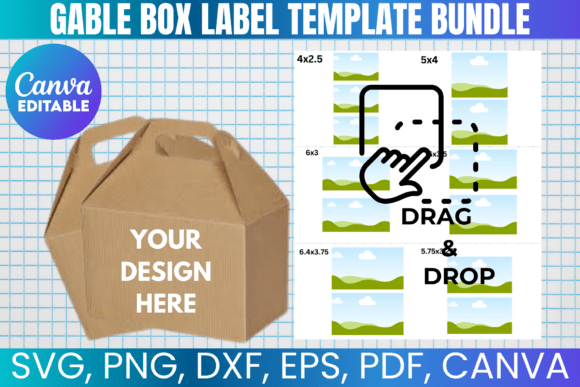
At its core, this bundle is a collection of editable design files built specifically for the front panel of gable boxes. You know the style: those folded paper or cardboard containers with a handle on top, commonly used for popcorn, candy, baked goods, party favors, and small gift packaging. The templates give you a structured starting point so you’re not wrestling with dimensions, bleed areas, or alignment from scratch. Instead, you open a file, drop in your graphics, adjust the text, and you have a print-ready label.
What’s Actually Inside the Bundle
The package includes multiple file formats, which matters more than most people realize. You get an SVG file that works with Cricut, Silhouette, CorelDraw, and Inkscape. There’s a PNG with a transparent background for layering in design software or uploading directly to print platforms. A DXF file is included for Silhouette users who prefer that format. There’s also a PDF with a solid white background for straightforward home or professional printing. And for anyone who wants to skip the learning curve entirely, a Canva link lets you drag, drop, and customize without installing anything.
Each format serves a different workflow. A crafter using a Cricut cutting machine needs vector paths. A small business owner creating product packaging might prefer Canva’s simplicity. A designer working in Adobe Photoshop or Illustrator might opt for the PNG or SVG. The bundle doesn’t force you into one ecosystem — it meets you where you already work.
Where These Templates Actually Shine
Gable boxes show up in more contexts than people initially think. Birthday parties and baby showers are obvious. But consider bakery packaging, wedding favors, corporate event giveaways, holiday gift bags, product launch kits, craft fair merchandise, and even subscription box inserts. Anywhere you need a small, portable, visually branded container, a gable box fits the role.
The front label is prime real estate. It’s the first thing people see, and it carries the visual weight of your design. A well-designed label can transform a simple paper box into something that feels like a curated gift. Think about the difference between handing someone a plain white box versus one with a cohesive label featuring your brand colors, a custom illustration, or a seasonal motif. The object inside might be identical, but the perceived value shifts noticeably.
For small business owners, this matters at a practical level. If you’re selling cookies at a farmers market or packaging handmade soap, the exterior design communicates care and professionalism before anyone tastes or tests the product. The Gable Box Front Label Template Bundle gives you a framework to build that impression without hiring a designer for every new batch or seasonal run.
Design Flexibility and Customization
Templates sometimes carry a stigma — people worry they’ll end up with something that looks generic or obviously templated. The reality depends on what you do with the starting point. These files are fully editable, which means you control the color palette, typography, imagery, and layout. The template handles the structural constraints: the correct dimensions, the fold lines, the printable area. Your job is the creative direction.
You might use a clean sans serif font for a modern, minimal aesthetic on product packaging. Or layer a handwritten script font over a watercolor background for a baby shower favor. The template doesn’t prescribe a style — it provides the canvas. Pair it with your existing brand assets, seasonal graphics, or illustrations you’ve licensed, and the result is yours.
For Cricut and Silhouette users, the SVG and DXF files open up possibilities beyond flat printing. You can cut intricate shapes, layer vinyl, or use specialty materials like glitter cardstock. The template measurements are included, so if sizing ever looks off in your cutting software, you can manually adjust using the provided dimensions. That kind of practical detail saves frustration during production.
Practical Considerations Before You Start
A few things worth noting before diving in. This is a digital product — nothing ships to your door. You download the files immediately after purchase and have lifetime access. Basic familiarity with your chosen design software helps, though the Canva option lowers the barrier significantly for beginners.
The usage terms are straightforward. You can create physical products for personal use or commercial sale. What you can’t do is resell, share, or redistribute the digital template files themselves. That distinction matters if you’re a small business owner planning to sell packaged goods — you’re fully covered to use the designs commercially, but the source files stay with you.
When evaluating whether this bundle fits your project, consider the scale of what you’re making. Gable boxes come in various sizes, and the templates are designed for standard dimensions. If you’re working with an unusually large or small box, check the measurements against your actual container before committing to a full print run. A quick test print on regular paper — taped to the box — can save a sheet of expensive cardstock.
Why This Approach Works for Busy Creators
Designing packaging from a blank canvas takes time. You need to account for margins, bleed, fold placement, and how the label wraps around a three-dimensional form. A template removes those structural unknowns. You focus on the creative layer — the part that actually represents your brand, your event, or your product.
That efficiency compounds. If you run a small bakery and need seasonal packaging four times a year, starting from zero each time is draining. With an editable template, you swap out colors, update a tagline, add a holiday graphic, and you’re done in a fraction of the time. The consistency also strengthens brand recognition. Customers start to associate that visual style with your work.
For event planners, bloggers, and content creators, the same logic applies. A blogger hosting a giveaway can create branded favor boxes that reinforce their visual identity. A content creator filming a tutorial can show polished, finished packaging that elevates the production value. These details accumulate into a perception of quality that audiences notice, even if they can’t articulate exactly why.
The Gable Box Front Label Template Bundle isn’t a magic solution — it’s a practical tool. It handles the technical groundwork so you can invest your energy in the design decisions that matter. Whether you’re packaging party favors for a backyard gathering or building a product line for an online shop, having reliable, editable templates in your toolkit removes friction from the process. And that’s ultimately what good design assets do: they let you spend less time solving structural problems and more time creating something worth holding.